Chapter 12
In the world
This chapter is about what a visitor sees, hears and does in a world with a Dream in it.
Arriving#
If the maker set intro cards, the Dream begins in the dark. The cards show one after another, each an image held for a moment. When the maker allows it, a click or the trigger moves the intro on one card. That moves it on for the whole room. The exception is joining a Dream by walking into its zone: then it moves on for you alone.
While the Dream's performers load, a card floats in front of you with a progress bar. It holds still until you look well away from it, then eases back in front of you. The controls stay away while it is up.
Then the world, and the controls.
What a Dream can do to you#
A Dream acts on each viewer, and most of it is yours alone. Two people in the same room can see different things.
- Text and image cards appear in front of you, inside a comfortable part of your view, and move aside for each other and for the controls. In VR they can appear on your hand instead.
- A prompt asks you a question with up to four answers and a countdown. Your answer can change the rest of the show for you.
- Your sight can fade to black and back.
- The sky can change, for everyone or for you alone.
- You can be teleported to a spot and placed in a line or a curve with the others.
- A camera shot seals you in the dark with one window on the world. You keep your head. Look around inside the shell all you like, but you cannot walk. In a shot that turns, the world moves and you do not. Turn away from the window and an arrow brings you back. The controls travel to a spot below the window for the length of the shot. A teleport that falls inside a shot does not happen at all. It is skipped, not saved for later.
- Your movement can be held or changed: no walking, no jumping, or a different speed.
- How you sound to others, and what you hear, can change: quieter, louder, farther, muffled, or echoing.
- An arrow can point you at something. A dotted path on the floor can lead you somewhere. It is a hint. It never moves you.
- A performer can turn its eyes, head or whole body toward you. Everyone sees the performer looking at them.
- A VRChat group page can open for you.
What you can do#
- Press play, pause, skip and scrub, if Who May Control allows you.
- Set your own volume. Resync.
- Fold the controls away, and move them. Open your settings with the cog, and the Dreamwalker toggle list with the t-shirt.
- Step through slides, if you are allowed to.
- Type a pin and open a gated Dream for everyone.
- Answer a prompt.
- Move the intro on, if allowed.
- Look at a Look Here target for a moment and the arrow goes. Look away again and it comes back after a moment. Walk into a Go Here spot and the path goes; step out and it returns.
- In VR, take hold of a performer and pose it, while the maker allows it.
- Walk into a Dream's zone to join it, and out to leave it.
The player controls#
A glass bar with the transport:
- Skip back ten seconds.
- Play and pause.
- Skip forward ten seconds.
- The time bar. Drag it to scrub. In a slideshow it spans the slide you are in.
- The current time and the length.
- A volume slider. It is yours alone and scales every sound the Dream makes for you.
- Resync, which snaps you back in step with the room. It shows only when the Dream has something to resync to.
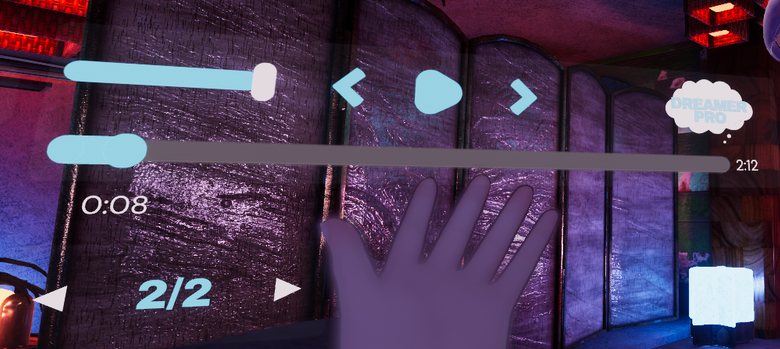
A small message bubble on the bar tells you what is happening: "Opening this Dream", "Loading...", "Enter the pin to open this Dream", "That pin is not right", "This Dream is private", "Host controls playback", "Dream complete". In a Dream where only named people may control it, the bubble says "The presenter controls playback" instead.
When you are not allowed to control playback, play, skip and scrub go away. The time bar slides to the middle and stays, smaller, as a readout. Volume and resync are still yours. The bubble says who controls playback.
Where the controls live#
The Dream's Player settings choose one of two:
- Stationary. The controls stay where the world's maker put them. There are no settings to change.
- Moving. The controls are yours. On desktop they float in front of you, or sit on your screen. In VR they ride your hand to start, or float.
Floating controls follow you. After about fifteen seconds of no use they blink away, and only the small plus sign is left, still following you. Click anywhere to bring them back. In VR you can also grab the bar and hold it somewhere. It drifts back when you let go.
Hand controls sit on your wrist in VR. Raise that hand and glance at it, like checking a watch, and they appear. Lower it or look away and they go. On the right hand, the buttons and the slide controls move to the right of the bar, and the Dreamwalker toggle panel opens on the left: the mirror of the left-hand layout. Angle panels leans it the matching way.
On screen puts the controls on your own screen on desktop: the main controls at the bottom, the slide controls top right, the buttons top left. It is how desktop starts. Press Tab to free the cursor, then click. A note beside the buttons says so. On a phone, tap.
The collapse button, a small plus or minus beside the bar, folds the controls away and brings them back. If you fold them on purpose, they stay folded until you press the button again.
Your settings#
Under the collapse button sit two more small buttons: a t-shirt and a cog. The cog opens a settings panel above the controls; it starts closed. It shows only the rows your platform has, and your choices are yours, kept as you move from Dream to Dream in the same world.
- Controls. On desktop, Floating or On screen. In VR, Floating or Hand.
- Angle panels. On, the settings panel leans toward you and the small buttons and the toggle panel turn inward. It is on to start.
- Automatic hand switching, in VR. On, the controls hop to whichever hand you raise. Off to start.
- Hand, in VR: Left or Right. Which hand carries the controls when they do not switch by themselves.
The t-shirt turns the Dreamwalker toggle list on and off for you. While a performer offers parts you can switch, a panel beside the bar lists them, one switch per part, and what you switch is yours alone. The list is off to start, and the t-shirt is greyed out while no performer offers anything.
The slide panel#
In a slideshow, a smaller glass panel sits under the controls: previous, a slide counter, next, and the slide's name. It sits with the controls, on the wrist when they ride the hand. Someone arriving mid-show lands on the slide everyone else is watching. A viewer Who May Control does not allow gets no slide panel.
The pin box#
A Dream gated by pin shows a box for a six-character pin and an Enter button. A Dream gated by name has no box; it opens by itself for the people on the list. The right pin opens the Dream and it plays for everyone in the room. A wrong pin shakes the box, turns the message red for a moment, and leaves what you typed so you can fix it. In VR, the right pin gives one buzz in the right hand, and a wrong one gives two.
Posing a performer#
When a Mechanics node with "Watchers can pose this performer" is playing, bring your hand near the performer's head, a hand, a foot, a knee or the hips, and a small bubble shows inside the part. Squeeze the grip to take it. The part is yours while you hold it. Where the maker allows it, pull the trigger while you hold a part and it stays where you left it; take hold of it again to free it. A small bubble stays inside a part you are holding to remind you of the trigger.
In a Shared Dream, everyone in step with the room sees what you pose, and you see theirs. If your playback drifts from the room's, the room's poses go while yours stay with you; back in step, everything shows again. When you are dreaming on your own, what you pose is yours alone. The rest of the performer keeps performing. Let go, and the part eases back into the recording after about a second, unless the maker set poses to stay. Posing needs VR hands. Desktop cannot pose and sees no bubbles. Two hands on the same part: the first hand keeps it.
Shared and Local#
In a Shared Dream everyone watches the same moment. Pausing or seeking changes it for everyone who may control it.
In a Local Dream everyone has their own playhead. Walking in starts your show. Walking out pauses it where you stood. Walking back in picks it up. Watching to the end lets it start from the top next time.
Several Dreams in one world#
A world can hold several Dreams, each with its own zone. You watch one at a time: the one whose zone you are standing in. Walk into another zone and that Dream becomes yours.
VR, desktop and Quest#
- Desktop has everything except posing and hand surfaces. Its controls float or sit on the screen.
- Quest plays every recording. At most three performers perform at once. Any others are still on stage, left as the scene had them, until one of the three leaves.
- In VR the pin box uses the VRChat keyboard.